
For centres and clubs
Your club’s tournaments, from sign-up to result picture
The organiser creates and runs americano, mexicano and knockout from a phone or a computer. Players sign up in the app, and the standings run on the club screen. Americano and mexicano build the club standings, and the tournaments you choose count on the club ranking.
Free for now for centres in Denmark, Germany, Austria and the United States. Downloaded more than 800 times from the App Store and Google Play.
What it looks like
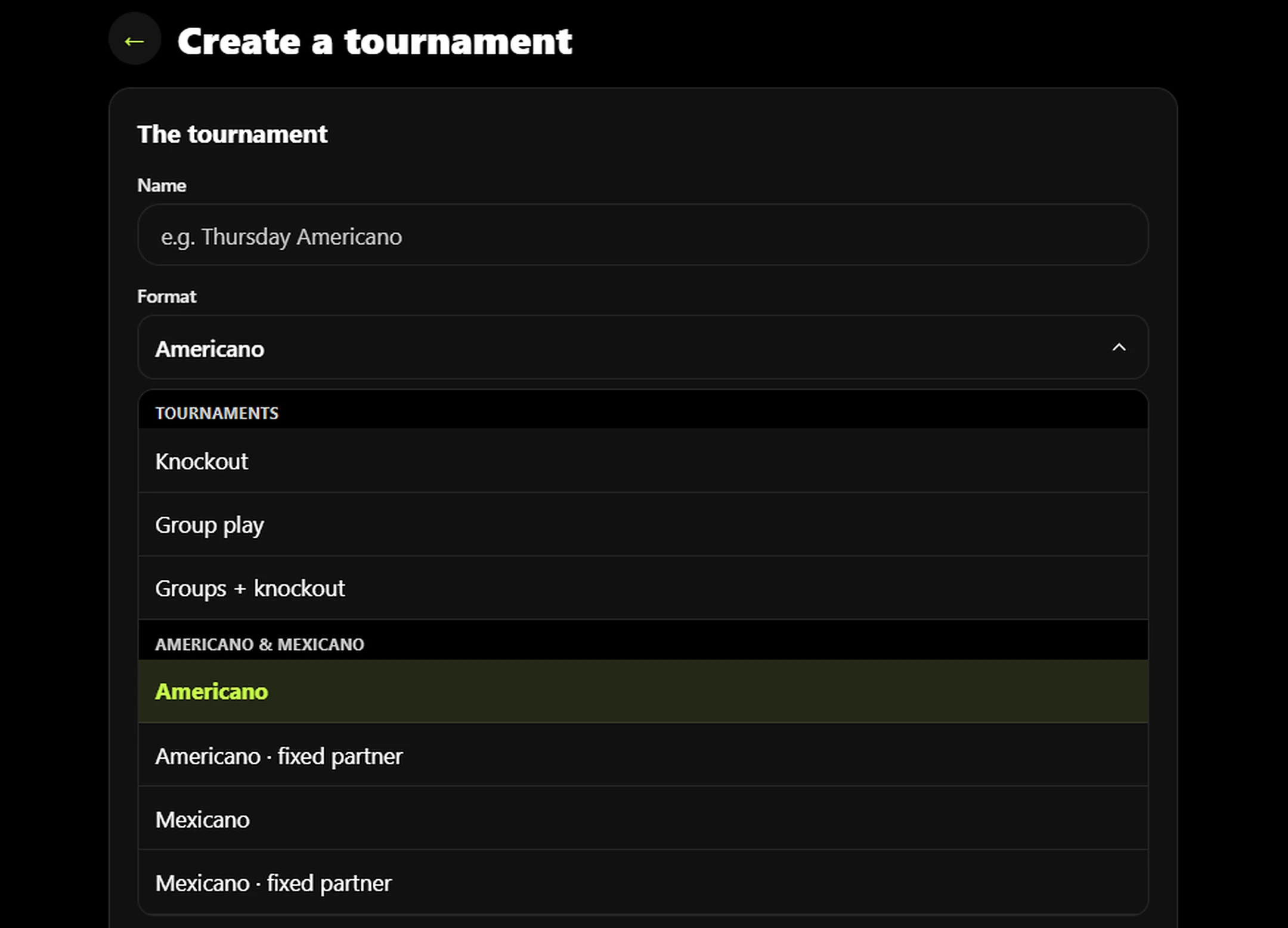
Seven formats
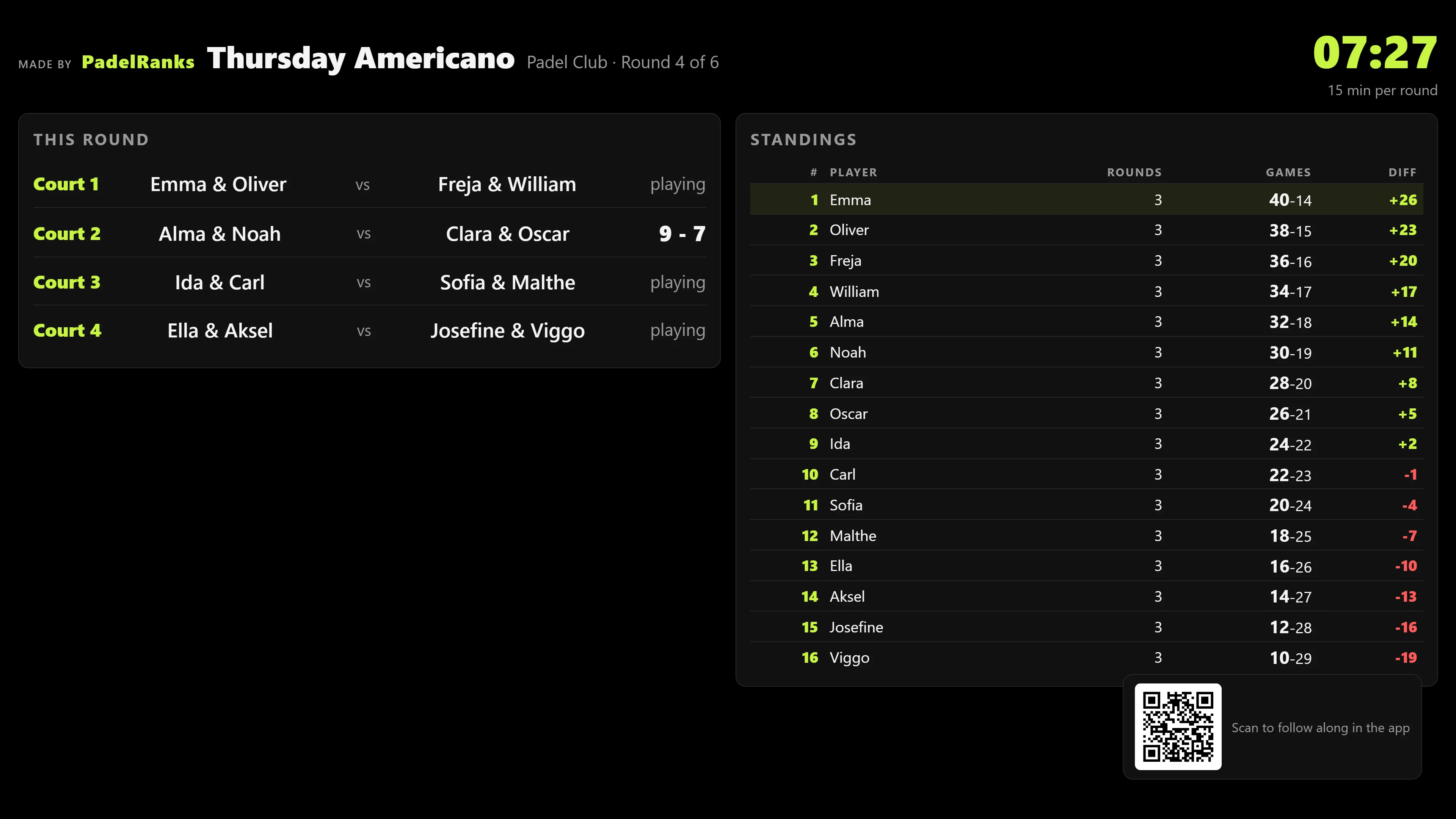
The club screen during a tournament
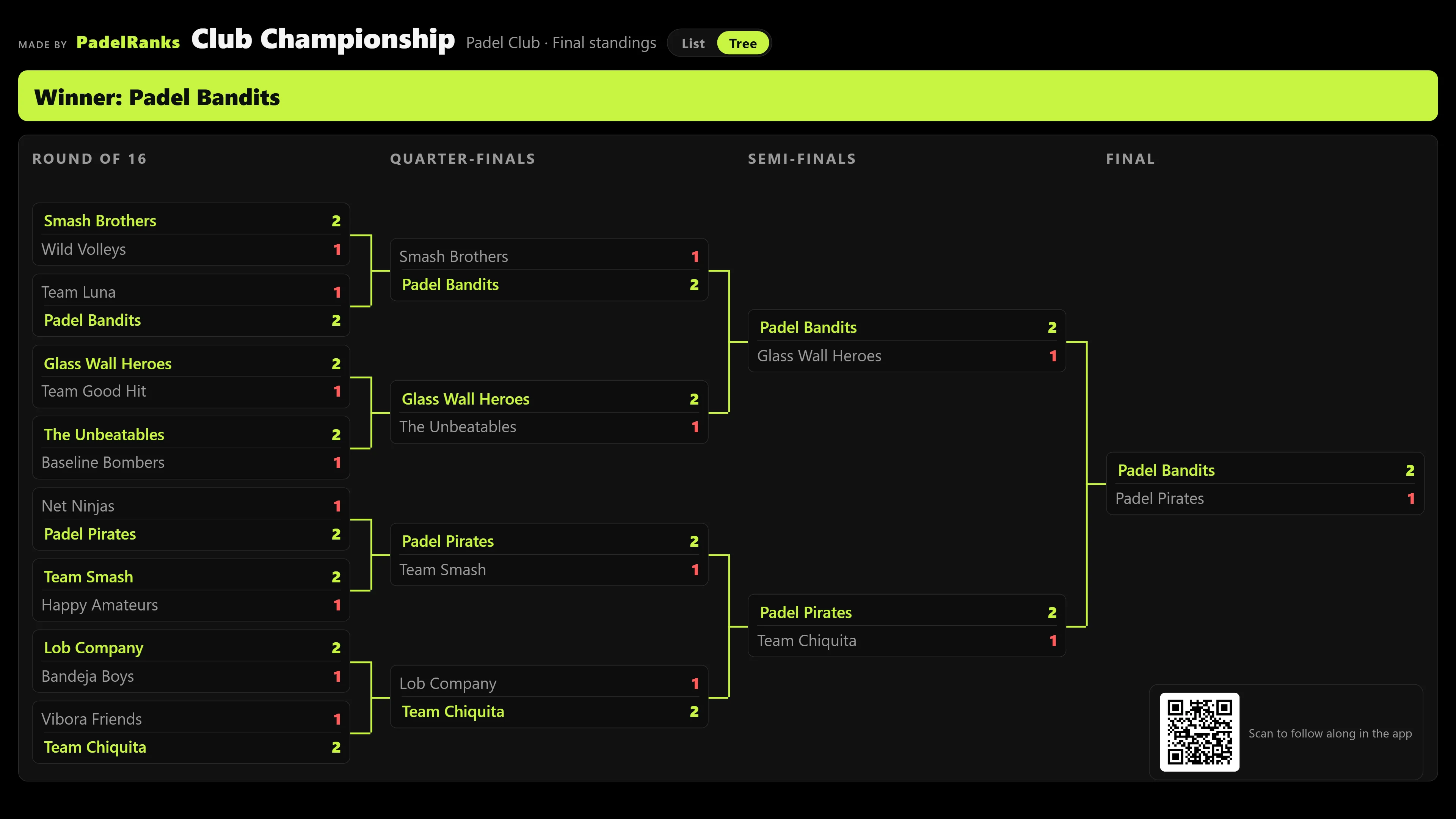
Knockout with a drawn bracket
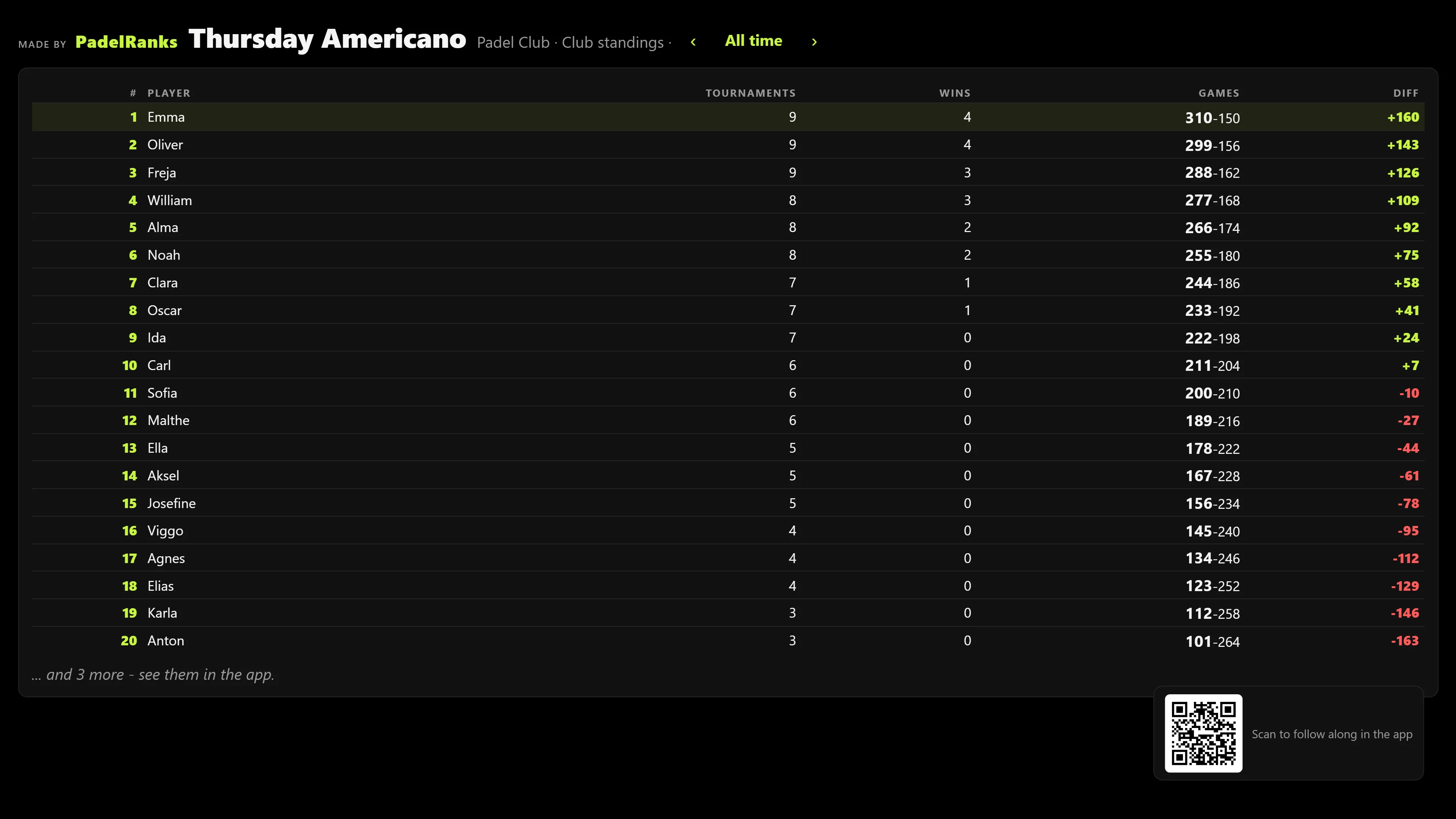
The club screen between tournaments
Club standings and club ranking
How a club night runs
An example: an americano for your centre’s members (“Members only”), 16 players on four courts, five rounds of 20 minutes, Thursday at 19:00.6 steps
- The week before
Create again
The organiser opens last week’s americano and taps “Create again”, so the format, courts, time, sponsor and visibility come along, and the date becomes the same weekday. Your centre’s members get a notification and sign up in the app, and the day before, everyone signed up and the organiser get a reminder.
- 18:45
Getting ready
The organiser adds the players who signed up without the app, and they become regulars who count in the standings. The “Big screen” button at the top of the tournament opens the live board for the club TV.
- 19:00
Draw and start
“Draw and start” closes the sign-up, and the app puts the players on courts with a new partner each round. Players with the app see their court, the organiser starts the clock, and the club screen shows the courts, the standings and the time left in the round.
- 19:20
Round over
When the time is up, the organiser’s phone rings, even with the app closed, and again after 30, 60 and 90 seconds until someone taps “Stop the alarm”. The organiser enters the games for each court, taps “Next round”, which shuffles the pairs, and starts the clock again.
- 20:55
Last result
Once the last round is entered, the tournament ends by itself. The final standings come up on the club screen, and the result counts in the club standings, and on the club ranking if the tournament is set to count there.
- 21:00
The pictures
The organiser shares the tournament result as ready-made pictures with your centre’s logo and sponsors, and can get a ready text for Facebook and Instagram. Every player with the app can share their own “My tournament” card.
Everything the club gets
Fetch from Padelmates
Padelmates tournaments to members
Notifications to players
On time or to points
Court board screen
Club statistics in the portal
Your centre’s logo
“That is me”
Lunar teams in the portal
“My tournament”
Text for Facebook and Instagram
Sponsors on the screen and the pictures
The same tournament again
A club championship over several weeks
Free courts on the week picture
Get started in five steps
Get the app and sign in
Sign in with Apple or Google. You must be at least 16.
Send a request under Cup
Tap “Set up your centre” and enter the club’s name, town and country (Denmark, Germany or Austria). If the name exists already, you are told. A centre in the United States sends the request on app.padelranks.online under Tournaments, where it also picks its time zone.
PadelRanks approves the centre
You become the organiser as soon as it is approved, and you are told in the app.
Create your first tournament
Americano is the easiest to start with. Demo players let you try the format before you invite anyone.
Share the join code and open the big screen
Players scan your centre’s QR code or enter the code under “Code” in the menu. The “Big screen” button at the top of a tournament opens it.
Features
Getting started and roles
How a centre is set up, and who does what.6 features
Send a request
Under Tournaments in the web portal, or in the app under Cup in Denmark, Germany and Austria, tap “Set up your centre”, enter the club’s name and country and send the request. Once PadelRanks has approved it, you are the organiser and are told in the app.
Is your centre there already?
If you type a name that exists, the app shows that centre, and you can tap “Ask for access” instead. The request goes to the centre’s organisers.
Getting started
A new centre gets a checklist on the Dashboard: the first tournament (americano is the easiest), demo players, the big screen button and the join code. Outside Denmark there is a fifth step: start Find a Match in your town.
Dashboard
The organiser’s page, with one card per centre: tournaments, this week’s programme, members, regular players, standings and club ranking, sponsors, the club screen, the join code and the organisers. It is in the app and in the web portal.
More than one organiser
An organiser can make other members of the centre organisers. Each tournament is run by the organiser who created it, and the others can see it.
Name, country and organisers
To change the centre’s name or country, or to remove an organiser, write to kontakt@padelranks.online, and PadelRanks does it.
Tournaments
The formats, and the choices you make when you create a tournament.11 features
Seven formats
Americano and mexicano, both also with a fixed partner, plus knockout, group play and groups + knockout.
Sizes
Knockout for 4, 8, 16, 32 or 64 teams, with empty places as byes, and group play for 4 to 16 teams. Americano and mexicano for 4 to 40 players or 3 to 20 pairs, and groups + knockout with 2 to 8 groups of 3 to 8 teams.
The tournament’s details
A name, the day and start time, an optional sponsor shown as “Sponsored by …” above the draw, and a text about the tournament, such as food and parking, that everyone signed up can read.
Who can find it
“Everyone” lists the tournament for everyone in your country who is signed in, “Members only” for your centre’s members, and “Code only” hides it from everyone without the code until it is full or started. Americano and mexicano are never listed for everyone.
On time or to points
Rounds are played on minutes or to 12, 16, 18, 21, 24 or 32 points. Played to points, the organiser enters one side’s points and the app works out the other.
Courts and rounds
By default there is one court per four players, but you can choose, and a line shows how many rounds each player gets and roughly how long it takes. Courts can have names, shown in the round and on the club screen.
Counts on the club ranking
Switch it on for a tournament, and its matches move points on the club ranking when it is finished.
Create again
Copies a tournament with its format, size, courts, court names, time, sponsor, description and visibility. The date becomes the same weekday next time, and you check the day and time before you save.
Demo players
Fill a tournament with demo players, pairs or teams and run a round to try the format. They count only in that tournament.
Dates per round
In knockout and group play you can fix the day a round is played and leave others open, so a tournament can run over several weeks.
Change it later
The name, dates, details and settings can be changed after the tournament is created. The format cannot, and the size cannot after the draw.
During the tournament
From the draw to the last result.11 features
Draw and start
“Draw and start” closes the sign-up. A tournament that is not full can still be played.
Americano and mexicano run themselves
The app puts the players on courts with a new partner each round, in mexicano by the standings, and shares out the sit-outs fairly. Players with the app see their court, and when the last round is entered, the tournament ends by itself.
Round clock and alarm
The organiser starts the clock, and when the time is up, the organiser’s phone rings, even with the app closed, and again after 30, 60 and 90 seconds. “Stop the alarm” in one place stops it everywhere, also when the round was started in the web portal.
More or fewer courts
The number of courts can be changed while the tournament runs and applies from the next round.
Knockout as a list or a bracket
In the app a knockout shows as a list or a bracket, matches can be put on named courts, and they are played best of three sets with a match tiebreak to 10. If you change a result that later rounds build on, those rounds are cleared.
Players enter results
In knockout and group play, players linked to an entry can enter their match result. After that only the organiser can change it.
Match chat
The players in a knockout or group match can write to each other and agree a time and place, and the organiser can read along. The thread closes when the match is played.
Group play
Everyone plays everyone, and a win gives 3 points. On equal points, sets decide, then games.
Who goes through
In groups + knockout, 1 to 3 go through from each group, plus the best of those just behind. The app suggests the qualifiers in seed order, and the organiser can move or swap teams before confirming.
Finish, undo and cancel
“Finish the tournament” makes the standings final, and “Undo the draw” opens the sign-up again. Cancelling tells everyone signed up and cannot be undone.
One button for the next step
At the top of a tournament, the next action is one big button, such as share, start, next round or big screen. The rest is under “More”.
Club screen and court board
The club TV during a tournament and between tournaments.7 features
The big screen button
“Big screen” at the top of a tournament opens the live board on the phone, for AirPlay for instance, or shares the link for the club TV.
During a tournament
The americano board shows courts, the round clock, sit-outs and standings, a knockout shows as a list or a bracket, and group play as tables. A QR code lets players sign up or follow along in the app.
Between tournaments
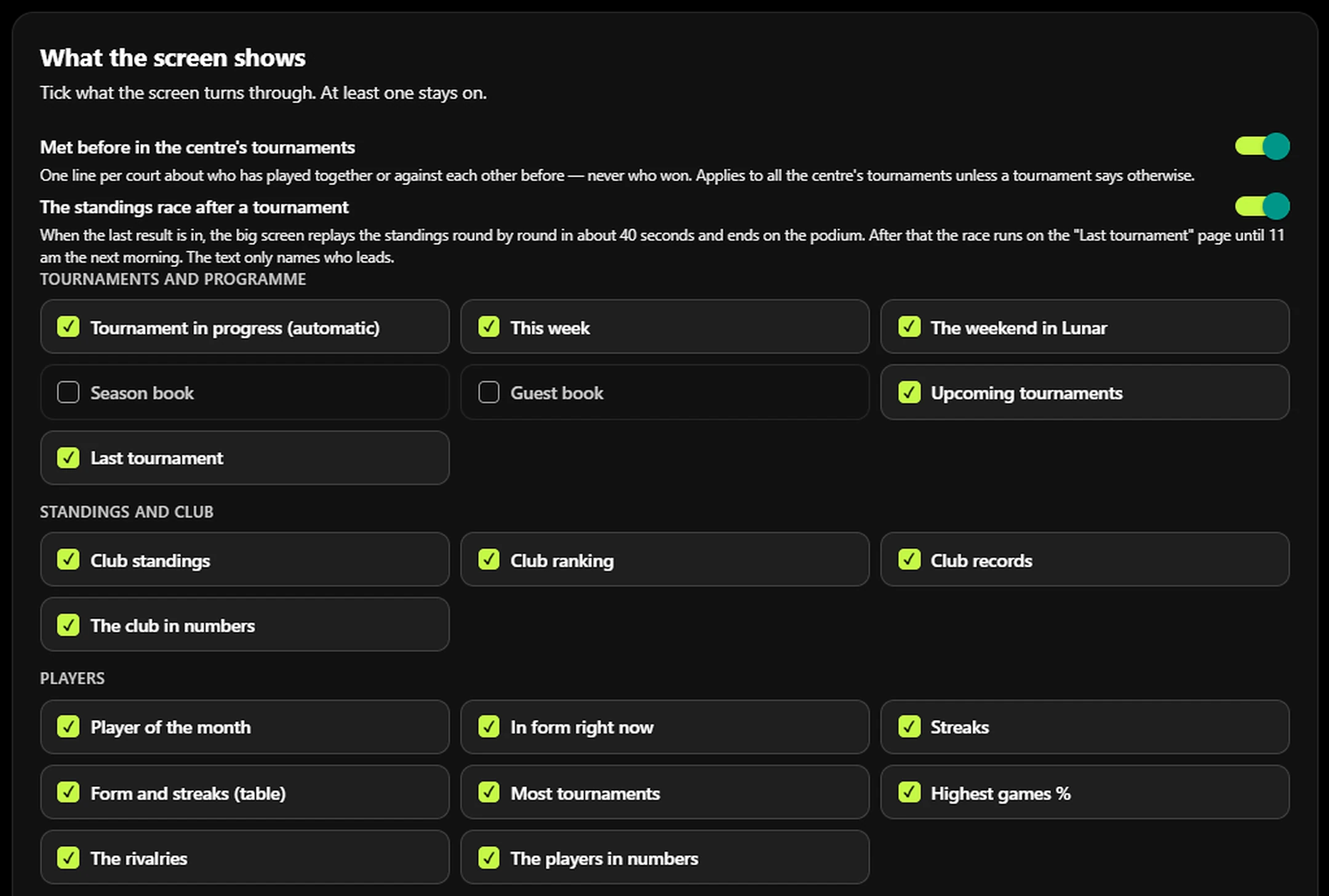
The screen turns through the pages you pick, such as this week, club standings, club ranking, player of the month, streaks, rivalries, club records and upcoming tournaments. When a tournament starts, it takes over the screen by itself.
Screen settings
You choose the seconds per page, how many days this week covers and what it shows. Changes reach the screen within about 20 seconds, and “New link” makes the old one stop working.
QR code for members
Every page between tournaments carries a QR code, so players can join the club in the app.
Sponsor logos on the screen
Your centre’s up to four sponsor logos sit at the foot of the screen between tournaments and, if you like, under the live standings.
Court board
If your centre uses Padelmates, an extra screen link shows every court as taken or free now and next, refreshed every minute. You choose whether the courts stand under or beside each other, and whether PadelRanks tournaments are included.
After the tournament
The standings, the ranking and the pictures.8 features
Club standings
Every finished americano and mexicano counts in standings per format that are kept for good. The period runs from All time down to 2 weeks, and members see the same table.
Club ranking
Matches from tournaments that count on the club ranking move points across formats. Everyone starts at 1000, regulars without the app are included, and “How the points are counted” explains the rest.
My statistics
Every player sees their tournaments, their place in the centre’s standings and on the club ranking, tournaments and matches won, and their average place.
Club statistics in the web portal
A table of everyone who has played americano or mexicano at your centre, with wins, top 3 finishes, games %, places and partners, and a table of form and streaks. Both can be shown for the period you pick.
Result pictures
After an americano, mexicano, knockout or groups + knockout, the organiser shares ready-made pictures with your centre’s logo and sponsors: podium, table and the tournament’s numbers, or winners, final and semi-finals. They can be shared in one go, saved to Photos or downloaded as PNG in the web portal.
My tournament
Every player in an americano or mexicano can share their own card with their place, points, best round, best partner and place on the club ranking.
Text for Facebook and Instagram
Under the result pictures, the app writes a ready post from the tournament’s numbers, short or long, in Danish, English or German. You can edit it and copy it, and PadelRanks never posts anything.
This week’s programme
A picture of several pages with the week at your centre: your own tournaments, and in Denmark, Germany and Austria also activities from Padelmates or Matchi, plus the Lunar matches and DPF tournaments at the hall for Danish centres or the club’s Rankedin events for German and Austrian centres. It carries your logo and up to four sponsors.
Players without the app
Everyone can play, also those without a phone in their pocket.5 features
Typed names become regulars
A name the organiser types into an americano or mexicano becomes one of your centre’s regular players and counts from then on in the club standings and on the club ranking. Two with the same name get a tag.
Entries by phone or on paper
The organiser adds entries as teams, pairs or players and can link a profile, so the player can enter results.
Regulars on the Dashboard
The organiser can create, rename, tag, archive, delete and restore regular players.
From a name to a profile
When a regular gets the app and joins the centre, the organiser links the name to the profile, and the tournaments and statistics move along.
“That is me”
A player can pick their typed name in the standings. The organiser is told and says yes or no, and the player gets the answer.
Sign-up, codes and members
How players join your centre and your tournaments.9 features
Sign-up in the app
Players sign up alone, as a pair or as a team, and pick their partner in the app or type the name. They sign in with Apple or Google and must be at least 16.
Waiting list
When a tournament is full, the next players go on a waiting list and move up by themselves with a notification. The organiser sees the order, and at the draw those still waiting are told.
Share the tournament
A ready text with a link, and the code if the tournament is hidden. The button shows how many have signed up.
The join code
Every centre has a code that can be copied and shared. “New code” stops the old one without removing current members.
QR code for members
The Dashboard shows a QR code that opens the app with the code filled in when it is scanned with the camera.
Welcome message
A ready text for your players with the code and a link, for you to pass on.
One code field
Players type every code in the same place, under “Code” in the menu: centre, tournament, training team and invitations.
The member list
The organiser sees each member, when they joined, and their tournaments, wins and games at the centre. A member can be removed.
What members see
For a member, your centre’s tournaments come first under Cup, split into In progress, Today, Coming up and Recently finished, and the club ranking and standings appear.
Notifications
Who is told what.8 features
New tournament
When you put up a tournament, your centre’s members are told the day, time and number of places. A tournament for “Everyone” also reaches those who have played at your centre before, and “Code only” sends nothing.
The day before
Everyone signed up and the organiser get a reminder, and the organiser’s shows how many have signed up.
To players during the tournament
In knockout and group play, players are told when the tournament starts, when they are through and when there is a new message in their match, but not once they are knocked out. When it is over, everyone signed up hears who won.
Americano and mexicano
Here players get no notification when the tournament starts or ends, because they are in the hall watching the club screen.
To the organiser
The organiser is told when the tournament is full, when the groups are done, the day before with the number signed up, when the round alarm rings, and when someone asks for access or sends “That is me”.
Cancelling and the waiting list
If a tournament is cancelled, everyone signed up is told, with the date, including the waiting list. Players who move up from the waiting list, or did not get a place, are told too.
Padelmates tournaments to members
If your centre uses Padelmates, the organiser can pick one of the club’s tournaments there in the next 14 days and send your members a notification. It can go out at most twice per tournament and three times a day per centre, and a tap opens Padelmates.
Players decide
In Settings, players can switch off Cup notifications, “News from your centres” and training messages. All are on from the start.
Training teams
Sessions and matches for a regular group, with replies, a waiting list and messages.7 features
Create a team
Anyone signed in can create one training team with a name and town. They become its admin at once and get a code for the players.
The team’s admin page
The code and a new code, the team list, more admins and removing members, all in one place.
Sessions and matches
An activity has a day and time, a meeting time, place, note, reply deadline, number of places and a waiting list, and can repeat weekly for 2 to 12 weeks. Reminders go to those who have not replied and to those who are coming.
Replies and declines
Members accept, go on the waiting list and move up with a notification, or decline with a reason that only admins see.
Team messages
Everyone writes, or admins only, and before a message is sent, it says how many people it reaches. Messages are kept for 6 months.
Matches in training
Four players on sides A and B with a court and a note, results in sets, a match chat and a table with points, rating and head-to-head.
Training notifications
Notifications go out for invitations, moving up, cancellations and reminders, and for matches that are created, full, cancelled or given a result.
Padelmates, Matchi, Lunar and Rankedin
In Denmark, Germany and Austria, link your centre’s own systems, and the pictures and the screen fill themselves.9 features
Link your systems
Under This week’s programme, the organiser links your Padelmates clubs or Matchi venues. Danish centres also link their Lunar club and the DPF calendar’s spellings, German and Austrian centres their Rankedin organisation, and the pictures, the club screen and the notifications use what you pick.
Fetch from Padelmates
An activity in the next 14 days becomes a tournament with its name, day, time, courts and the players signed up. An open tournament can also be filled from there.
Free courts on the week picture
In the web portal you can fetch the week’s free 1½- and 2-hour courts from Padelmates and put them on the week picture, one time or a whole day at a time.
Logo from Padelmates or Matchi
Your centre’s logo is fetched from Padelmates or Matchi, or you upload your own. It appears on the pictures and on the club screen.
Activities from Matchi
Matchi activities go on the week picture and the club screen just like activities from Padelmates.
Your club’s Rankedin events
German and Austrian centres link their Rankedin organisation, and its events go on the week picture.
Club in the Lunar League
A page per Danish club with PadelRanks’ club index, the weekend’s Lunar results with a short text and a picture to share, league matches at the hall and all the club’s teams. No player names and no predictions.
The weekend in Lunar on the screen
A page on the club screen with the club’s Lunar results from the weekend.
Lunar teams in the web portal
All your teams in the Lunar League on one page, with division, pool, place, matches and the next match.
The web portal
All of it on a computer, at app.padelranks.online.7 features
Everything on the computer
The organiser has Dashboard, Tournaments, Club statistics, Club screen, Club standings, This week’s programme, My statistics and Settings, plus Notifications with Padelmates and Lunar teams for Danish centres.
Sign in with your phone
Scan the QR code on the computer with your phone’s camera and confirm in the app. The code is valid for 5 minutes and only once, so the organiser needs the app first.
Safe on a shared computer
Without the tick at “Stay signed in on this computer”, the portal signs out when the browser closes, and signing out on the computer does not sign the phone out.
“Today” in the menu
Your centre’s tournaments that are running or set for today open with one click.
The whole round on one screen
On a wide screen, two or three courts stand side by side with the standings next to them, and the Tab key moves from court to court.
The bracket across the window
A 32-team bracket fits an ordinary screen, with arrows to step a round forward or back.
Small things
Every page has its own address for bookmarks, the last centre you picked is remembered, and the portal warns you before unsaved changes are lost.
Questions from centres
- What does it cost?
- It is free for now.
- Which centres can join?
- Centres in Denmark, Germany, Austria and the United States. You send a request on app.padelranks.online, or in the app under Cup in Denmark, Germany and Austria, and PadelRanks approves every new centre.
- Do players need the app?
- No. The organiser can add players by name, and they count in the club standings and on the club ranking. With the app, players sign up themselves, follow the standings and get notifications.
- Who runs a tournament?
- The organiser who created it: the start, the results, the alarm, cancelling and the result pictures. The centre’s other organisers can see it.
- Do we need Padelmates?
- No. Tournaments, the club screen, standings, the club ranking and the pictures work without it. You only need Padelmates for the things where this page says so. Centres in the United States use PadelRanks without Padelmates, Matchi or the Lunar League.
- How does the organiser sign in on a computer?
- Open app.padelranks.online and scan the QR code with your phone’s camera. Confirm in the PadelRanks app, and the computer is signed in as the same user.
Want your centre on PadelRanks?
Write to us, and we will help you get going with your first tournament.
Write to kontakt@padelranks.onlineOr send a request
On app.padelranks.online under Tournaments, or in the app under Cup, tap “Set up your centre”, enter the club’s name and country, and tap “Send request”. PadelRanks approves every new centre, and you are told in the app.
For centres in Denmark, Germany and Austria, and on app.padelranks.online also in the United States. Free for now.